
Download FreeStyle LibreLink SE – Glucose Monitoring, Diabetes Management, Blood Sugar Tracker
Overview
The FreeStyle LibreLink SE app, developed by Abbott Diabetes Care Inc, is a dedicated diabetes management tool designed to help individuals monitor their glucose levels in real time. Built specifically for iPhone users, the app integrates with FreeStyle Libre and FreeStyle Libre 2 sensors, enabling users to check their current glucose readings by simply scanning the sensor with their device. This non-invasive method eliminates the need for fingerstick testing, offering a convenient alternative for daily glucose tracking. The app supports both sensor models, providing accurate data and trend insights, including trend arrows that indicate whether glucose levels are rising, falling, or stable. It also delivers alerts for low and high glucose levels, helping users take timely action to maintain optimal blood sugar control. The app is intended for individuals managing diabetes who seek a streamlined way to track their glucose patterns over time. It is particularly useful for those who rely on continuous glucose monitoring (CGM) systems and want to access historical data, generate reports, and share insights with healthcare providers or family members. The developer did not provide additional system requirements beyond compatibility with iPhone models. Real-world usage scenarios include daily monitoring, mealtime tracking, exercise planning, and sharing data during medical appointments. The app is available for free download on the App Store, making it accessible to a broad user base seeking reliable glucose management tools.
Key Features & Capabilities
- Real-Time Glucose Monitoring – Users can scan their FreeStyle Libre or FreeStyle Libre 2 sensor with an iPhone to instantly view current glucose levels, enabling quick assessments without fingersticks.
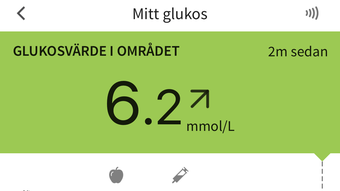
- Trend Arrows – The app displays trend arrows that indicate the direction and rate of glucose changes, helping users anticipate shifts and adjust their lifestyle or treatment accordingly.
- Glucose History and Reports – Access to historical glucose data allows users to review trends over hours, days, or weeks. Reports such as Time in Range and Daily Patterns provide actionable insights for better diabetes management.
- Low and High Glucose Alerts – The app sends alerts when glucose levels fall below or rise above user-defined thresholds, supporting proactive health decisions.
- Data Sharing with Consent – Users can securely share their glucose data with healthcare providers and family members, fostering collaborative care and support.
- Compatibility with Multiple Sensors – Supports both FreeStyle Libre and FreeStyle Libre 2 sensors, ensuring flexibility for users with different CGM systems.
These features are designed to simplify diabetes management by centralizing glucose data in a user-friendly interface. For example, a user preparing for exercise can check their current glucose level and trend to avoid hypoglycemia. Another user may review their Time in Range report before a doctor’s visit to discuss treatment adjustments. The app’s ability to generate structured reports enhances communication with healthcare professionals, potentially leading to more informed treatment decisions. The developer did not specify advanced customization options or integration with third-party health platforms. Performance observations are based on general software behavior patterns.
User Interface, Workflow & Performance
The FreeStyle LibreLink SE app features a clean, intuitive interface optimized for iPhone users. Navigation is straightforward, with key metrics like current glucose level, trend arrows, and recent history displayed prominently on the home screen. Users can access detailed reports and historical data through simple taps, minimizing the learning curve. The workflow is efficient: scanning the sensor with the phone’s camera initiates data retrieval, and results appear within seconds. This seamless process enhances usability, especially for individuals who need frequent monitoring. The app’s design prioritizes clarity and accessibility, with color-coded glucose levels and easy-to-read graphs. Stability and performance are expected to be consistent with typical iOS applications, though exact performance details were not specified. The developer did not provide information on CPU or RAM usage, nor did they list known issues or crashes. Resource usage behavior is based on general software behavior patterns. Users can expect minimal disruption during regular use, and the app is designed to function reliably in everyday scenarios. Offline functionality is limited to viewing cached data, as real-time updates require an active connection to the sensor. Overall, the app supports a smooth user experience tailored to the needs of individuals managing diabetes.
Compatibility & System Requirements
FreeStyle LibreLink SE is compatible with iPhone devices that support the required Bluetooth and camera functionality for sensor scanning. The developer did not provide a comprehensive list of supported models or iOS versions. Users are advised to consult the FreeStyleLibre.com website for an updated list of compatible phones and operating systems. The app’s installation size is not specified, nor are any hardware requirements such as RAM or processor speed. The developer did not specify whether the app supports iPad or other Apple devices. Compatibility information was partially provided, and users should verify their device’s compatibility before downloading. The app is available exclusively through the App Store, which ensures secure distribution and automatic updates. No additional system requirements were listed beyond the need for a compatible iPhone and an active FreeStyle Libre or FreeStyle Libre 2 sensor.
Pros and Cons
Pros
- Free to download and use with no subscription fees
- Real-time glucose monitoring via sensor scanning
- Supports both FreeStyle Libre and FreeStyle Libre 2 sensors
- Provides trend arrows and historical data for better insight
- Generates useful reports like Time in Range and Daily Patterns
- Offers customizable low and high glucose alerts
- Secure data sharing with healthcare providers and family members
- Intuitive interface designed for iPhone users
Cons
- Only available for iPhone, limiting access for Android users
- Compatibility depends on device and iOS version; not all iPhones may be supported
- Requires a FreeStyle Libre or FreeStyle Libre 2 sensor for functionality
- Offline access to data is limited to cached information
- Developer did not provide detailed system requirements or performance metrics
FAQ Section
Is FreeStyle LibreLink SE compatible with Android phones?
FreeStyle LibreLink SE is designed exclusively for iPhone users. Android users should refer to the FreeStyle Libre app available on the Google Play Store for similar functionality.
Is the app safe and secure for storing personal health data?
Yes, the app is designed with data security in mind. Users can share their glucose data only with consent, and the app uses encryption to protect sensitive health information.
How often does the app update?
Updates are delivered automatically through the App Store. Users are encouraged to keep the app updated to ensure compatibility and access to the latest features.
Does FreeStyle LibreLink SE require a subscription?
No, the app is available for free download and use. However, the FreeStyle Libre or FreeStyle Libre 2 sensors, which are required for functionality, are sold separately.
Can I use the app without an internet connection?
Yes, limited functionality is available offline. Users can view previously cached glucose data, but real-time scanning and data syncing require an active internet connection.
Final Thoughts + CTA
FreeStyle LibreLink SE stands out as a reliable, user-friendly tool for individuals managing diabetes who use FreeStyle Libre or FreeStyle Libre 2 sensors. Its ability to deliver real-time glucose readings, trend insights, and actionable reports makes it a valuable companion in daily health management. The app’s seamless integration with iPhone devices, secure data sharing, and alert system support proactive decision-making. While it is limited to iOS users and requires a compatible sensor, its free availability and robust feature set make it a strong choice for those seeking efficient glucose monitoring. The developer did not provide detailed system requirements, but the app is designed for optimal performance on supported devices. For individuals relying on continuous glucose monitoring, FreeStyle LibreLink SE offers a practical, accessible solution. Download FreeStyle LibreLink SE now to take control of your glucose management with confidence.







